Tuesday, September 24, 2013
Samsung Galaxy Tab 7 7 User Manual
 |
| Google Images |

Sunday, September 15, 2013
Samsung Ativ Smart PC Price and Specs Windows 8 Tablet with Full HD display

Monday, June 10, 2013
Samsung I9300 Galaxy S III Manual Guide Pdf
Thursday, May 30, 2013
Samsung Galaxy Ace Plus There is always a sequel
It seems that Samsung has taken note of the major drawbacks found in its initial Ace offering, and provided improvements in many key areas, most notably a more robust processor and larger internal storage.
And while it is an improvement per se, VGA video recording @ 30 fps is nothing to write home about, considering the original Ace had that fixed via a software update. Now that Samsung upped the processor to 1Ghz. That being said, the Ace Plus offers a spec sheet that we would write home about, if, you know, we didnt have cell phones and such.
Take a look:
Key features
Quad-band GSM and dual-band 3G support
7.2 Mbps HSDPA support
3.65" 16M-color TFT LCD capacitive touchscreen of HVGA (320 x 480 pixels) resolution
1 GHz ARM Cortex A5 processor, Adreno 200 GPU, Qualcomm MSM7227A chipset; 512MB of RAM available to the user
Android OS v2.3 (Gingerbread) with TouchWiz 4.0 UI customization
Swype text input
5 MP autofocus camera with LED flash; geotagging, smile detection3 GB of internal storage, microSD slot
Wi-Fi 802.11 b/g/n and DLNA
GPS with A-GPS connectivity; Digital compass
microUSB port (charging) and stereo Bluetooth v3.0
Standard 3.5 mm audio jack
FM radio with RDS
Document editor
File manager preinstalled
Samsung Apps brings a few nice apps for free
Accelerometer and proximity sensor
Main disadvantages
VGA video recording @30fps is nothing special
No secondary camera
No shutter key
Average loudspeaker performance
No ambient light sensor
No DivX/Xvid video support out of the box
While there were no blatantly poor areas in which the original Galaxy Ace needed to be improved upon (besides the camera, of course), the updated processor, internal storage, RAM and slightly larger screen make the Ace Plus feel-and perform-like an upgrade.
Android has seen many improvements since the Froyo 2.2 version originally found on the first Ace, and while its no Ice Cream Sandwich, Gingerbread 2.3.6 runs absolutely glitch-free on the Ace Plus.

Wednesday, May 29, 2013
Samsung Galaxy Note II review Bigger better and more improved
Introduction
The original Galaxy Note was a runaway success despite all the doubts that its size and stylus caused. Its understandable then, why the new Samsung Galaxy Note II was greeted with so much excitement. It brings a new and improved screen, boosts processing power significantly and makes the S Pen even better.
The screen of the new phoneblet is quite interesting - Samsung moved it to 16:9 aspect ratio, so it matches the Galaxy S III and extended the diagonal to 5.5". But the Note II Super AMOLED display isnt just the Galaxy S IIIs screen upsized or even that of the original Note.
Specifications:
General: GSM 850/900/1800/1900 MHz; UMTS 850/900/1900/2100 MHz, HSDPA 21 Mbps, HSUPA 5.76 Mbps; LTE 700/2100 MHz, 100Mbps down, 50Mbps up
Form factor: Touchscreen bar phoneblet
Dimensions: 151.1 x 80.5 x 9.4 mm, 180 g
Display: 5.5" 16M-color HD (720 x 1280 pixels) Super AMOLED capacitive touchscreen, Gorilla Glass 2
Stylus: S Pen, 1024 pressure levels, hover functionality
Chipset: Exynos 4212 Quad
CPU: Quad-core ARM Cortex-A9 1.6 GHz processor
GPU: Mali-400MP
RAM: 2GB
OS: Android 4.1.1 (Jelly Bean) Memory: 16/32/64GB storage, microSD card slot
Still camera: 8 megapixel auto-focus camera with backlit sensor, face detection and Best faces feature, touch focus and image stabilization;
Video camera: Full HD (1080p) video recording at 30fps, LED flash, 1.9MP front facing camera, video-calls
Connectivity: Wi-Fi a/b/g/n, Wi-Fi hotspot, Bluetooth 4.0, standard microUSB port with MHL features (TV Out, USB host), GPS receiver with A-GPS, 3.5mm audio jack, FM radio, NFC
Battery: 3100 mAh
Misc: TouchWiz 4.0 UI, Extremely rich video/audio codec support, built-in accelerometer, multi-touch input, proximity sensor, gyroscope sensor, RGB sensor, Smart stay eye-tracking, S Voice
A peek under a microscope revealed that the Samsung Galaxy Note II uses a completely new Super AMOLED matrix with three subpixels per pixel. Its an unusual matrix for sure, but it might be the sign of things to come for future Galaxy flagships.
The Galaxy Note II brings the second iteration of the S Pen. The new one is longer and thicker compared to the original, though not as big as the one in the Note 10.1. The new digitizer also offers a great deal of new features - better pressure sensitivity and hover detection of the stylus.
And there are some cool new software tricks to complement the improved stylus - the hover function triggers various previews (everything from email to video), the bigger button on the S Pen enables a variety of gestures and theres a new homescreen pane that automatically pops up when you use the stylus.
Speaking of software, the Galaxy Note II will be one of the first Samsung devices to launch with Android 4.1 Jelly Bean out of the box (along with the Galaxy Camera). The combination of the latest Android and the fast Exynos chipset with a quad-core processor clocked at 1.6GHz makes the Note II a performance beast.
At this point its clear, that we have one of the devices of the season on our hands here, so lets waste no more time and get down to testing.
Hardware overview
Well make a more detailed hardware inspection when we do a proper preview, but for this introduction of the Samsung Galaxy Note II well just cover the interesting bits.
The display and S Pen are arguably the most interesting hardware features, so they get their own chapters.
The Samsung Galaxy Note II takes the Galaxy S III design and upscales it. It has roughly the same surface area as the original Note, but is slightly taller and narrower. Its also a bit thinner and the weight is practically unchanged.
The narrower device does feel slightly better in the hand, but its still a large slab - its a full 10mm wider than the already big Galaxy S III. Yet the Samsung Galaxy Note II is not too hard to pocket - it might not fit every pocket, but its entirely possible to carry it around like a phone.
As far as connectivity goes, the Note II will come in two versions - HSPA+ and LTE. Both use the same Exynos chipset, but the LTE version has an additional modem (some Samsung handsets switch to a Qualcomm chipset for their LTE versions).
The Samsung Galaxy Note II only has a couple of wired ports, but between them they handle all the needed functionality.
The 3.5mm audio jack on top does wired headset and headphones duty, while the microUSB port on the bottom handles charging and data connection with a computer. Its also MHL-enabled, so you can output HD video through an HDMI adapter or use USB Host functions with another adapter.
The back of the phoneblet looks pretty barren - it houses an 8MP camera and a single-LED flash near the top and the loudspeaker near the bottom. The camera protrudes slightly, so the Note II rests on it when you place it on a level surface.
The 8MP camera, single-LED flash and loudspeaker are on the back • camera protrudes slightly
Samsung used the same hyperglazed plastic to construct the outer shell of the Galaxy Note II as on the Galaxy S III. It comes in Marble White and Titanium Grey. The back cover is removable and below it youll find the beefy 3100mAh battery along with the microSIM and microSD card slots. The SIM card is blocked by the battery.
There will be a flip cover accessory for the Note II. Its the same as the one the original Note and the Galaxy S III got. It replaces the back cover and provides protection for the screen. The flap is made of leather.
A lot of people were hoping that Samsung would move to a non-PenTile screen for the Galaxy Note II and the Koreans delivered. They changed other features of the screen too, like the surface on top, which is now Gorilla Glass 2.
Also, the diagonal grew to 5.5" (up from 5.3") and the aspect ratio changed - the Galaxy Note II uses a 720p screen (16:9) instead of WXGA (16:10).
What this amounts to is a taller, narrower screen (and consequently taller, narrower device) and a slightly reduced surface area - the Galaxy Note II screen has only 92% the surface area of that of the original Note. So, the increase in screen diagonal is a bit misleading, youre not getting more screen - its actually the opposite.
The removal of that 80-pixel wide strip also resulted in a slightly lower pixel density - 267ppi vs. 285ppi. The new matrix, however, makes up for that easily and the perceivable sharpness of the screen is actually higher.
Its no longer a PenTile matrix like on the original Note (which had a slight crosshatch patter noticeable, but only if you look really closely). Perhaps these photos snapped with a digital microscope will help clear up the differences in pixel arrangements.
The pixels of the Note II have one tall Blue sub-pixel on the left and smaller Green and Red pixels stacked one on top of the other. Its an odd arrangement, but it has three subpixels per pixel. The reason for the different Blue pixel is that Blue AMOLEDs typically have a shorter life and making them bigger balances things out. Also, the Blue pixel doesnt shine as brightly, which also improves its life, but doesnt affect color balance (because its bigger).
To illustrate how the different arrangement improves sharpness we used our microscope to snap a picture of very tiny text - the line width here is 1px, the font is white.
As you can see, the Galaxy Note II screen lights up individual pixels to display the 1px-wide lines. The old Galaxy Note, however, cant use a single pixel as each individual pixels cant make white, as it only has two of the three needed colors.
To fix that, the screen uses sub-pixel rendering, which "borrows" a subpixel from a neighboring pixel to make white. But now the line has become 1 2/3px wide.
This new arrangement seems to result in some very slight color aberrations around sharp edges, but it takes a great deal of eye-strain to try and see it.
One cool addition to the display settings is that even with Automatic brightness turned on, the brightness slider remains active. This allows you to fine-tune the brightness, but still have it adjust automatically to the environment.
The Samsung Galaxy Note II grew in size over the original and so did the new S Pen. The old one is about 10.4cm long and 5mm thick, while the new one measures 11.3cm in length and 7mm in thickness.
While nowhere near as comfortable as the S Pen on the Galaxy Note 10.1, the one that comes with the Note II feels more like a pen and less than a stylus, compared to the one inside the original Note.
The button on the S Pen now has a ribbed pattern, making it easier to find by touch (the old one is flat and flush against the surface, which made it tough to use).
The Galaxy Note II can detect when you pull the S Pen out and brings you to a contextual page, which offers shortcuts (with preview thumbnails) of your recent S Notes.
Since theres no lanyard linking the S Pen and the Galaxy Note II, the phoneblet uses its accelerometer to detect you walking away and will alert you if the stylus isnt in its slot. The feature is pretty conservative and wont trigger until youre several steps away - so you can walk and write without it bothering you, but if you really forgot it and walked away it will start beeping.
The new Samsung Galaxy Note II screen can detect the S Pen from a distance, similar to how the Galaxy Note 10.1 worked. The hover feature, called Air View, is not part of the stylus though, we tested the S Pen from the original Note and it worked just fine.
The Note II also features a more sensitive digitizer compared to the original. It can distinguish between 1024 different levels of pressure (quadruple what the original managed) and you can really feel the difference in the drawing apps - you get fine-grained control between thin and thick lines.
Camera and Video Recording
8MP camera with 1080p video recording
We wont spend too much time on the Samsung Galaxy Note II camera for now, but well revisit it in more detail in the preview.
It uses the same interface as the Galaxy S III and snaps up to 8MP stills and records 1080p@30fps videos. It has advanced features like burst shot, HDR, Share shot and Buddy photo share.
Samsung Galaxy Note II also has a feature called Best faces - it snaps a burst of 5 photos, keeping track of peoples faces. Later, you can pick any of the 5 photos for each persons face individually.
CONCLUSION
Our short time with the Samsung Galaxy Note II is over, but it was enough to whet our appetite and well surely be coming back for more.
The original Galaxy Note was virtually unchallenged in the phablet field, but it still faced the hard task of generating proper interest in the niche. The over 10 million units sold are the proof that it did a really good job. So in a way the Galaxy Note II is a lucky device - it comes in a market that is already starting to develop, but still devoid of any major competition. Now add the host of improvements it brings over its predecessor and things are looking really great for the Note II.
The way we see it, the Note II buyers will fall into two categories. First are the business people and artist who need the easy note taking, idea sketching or graphics tablet functionality.
The second category would be tech geeks who just want the big screen, powerful hardware and latest Android Jelly Bean goodness, with the S Pen being an extra rather than the central feature.
One thing is for sure though, the Note devices - both phablets and the tablet and tablet - have brought back the stylus from the brink of extinction. And while Android tablets are still having a bit of a struggle in the market, the Note hybrids are quickly conquering new ground for the Google OS.
No matter how you look at it, all indications point to the Galaxy Note II repeating - and most likely beating - the success of its predecessor. Heres hoping the good impressions stand after we spend a bit more time with the Note II.

Sunday, May 12, 2013
Samsung I8160 Galaxy Ace 2 Guide User Manual
 |
| Samsung I8160 Galaxy Ace |
Visible from the front, design samsung galaxy ace 2 samsung android is indeed similar to another that carries a full bar touchscreen design. However, ace body 2 has a more circular shape on the four sides to seem less so elegant to behold. the 2nd generation ace, the natural increase in the screen size, which is just beginning 3. 5 inches is now a little wider so 3. 8 inches.
Not only the width of the screen, the screen resolution is in fact also added either at the beginning of the series that is so 480x800 pixels. then do not be surprised if samsung galaxy ace 2 looks much clearer and softer. The screen resolution could have an influence on the activity in the pleasure of searching on samsung galaxy ace 2. Another addition, not only the resolution and size, the sharpness of the color is also more dense 246 ppi or approximately one half times the density of the screen on the galaxy ace. Size and body weight are also natural turnover, if the first dimension 112 galaxy ace, 4 times 59, 9 times 11, 5 mm and weighs 113 grams, is now finished 118 galaxy ace 2, 3 times 62, 2 times 10, 5 mm, and weight 122 grams. then, when grasped can feel a little more secure and comfortable. fitting in the bottom of the screen there are three main buttons, the shortcut keys, home and back. briefly at the side, there is the power button (on / off) all the lock screen, charger port, audio jack 3. 5 mm, and volume control buttons.
Note :
Without a protective screen corning gorilla glass.
Features
Galaxy ace 2 equipped with a 5 Mpix camera (2592x1944 pixels) with LED flash and VGA front camera, just like the first galaxy ace. but the point of rest, have a galaxy ace 2 hd 720p quality recording. menu geotagging camera is equipped with features, impact, setting white balance, shoot a means smile, and a variety of standard features something a smartphone camera., the multimedia menu, there is a music player and FM radio. for flash playback is very smooth path with time playing video with 720p resolution, if the tab is in the open slightly.
For connectivity, there is a microSD slot, microUSB, audio jack 3, 5mm, bluetooth. used when surfing in cyberspace, is not just a smartphone equipped with gprs or edge, but also the speed with HSDPA of up to 14. 4 mbps. do not miss, well prepared for data access wifi internet connection.
Note
FM radio access roads can only be associated with a headset after. remained on android os 2. 3 gingerbread.
Performance :
Samsung galaxy ace 2 is not naturally turn to the data network sector remained on 2g and 3g. but the power sector runway, galaxy ace 2 is present dual-core processor though still only 800 mhz. to maximize the performance of graphics, this smartphone has been immersed Mali-400MP GPU.
Change also applies to the default battery capacity is 1500mAh which is the greater, rather than just the previous series of 1350 mah. because many have complained if the galaxy ace first output if used too wasteful batteries. in normal circumstances, this smartphone can last approximately 600 hours.
Thursday, April 4, 2013
Samsung Galaxy S2 Dual Core Android Phone Launched in India
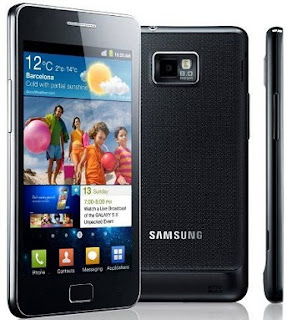 Samsung Electronics has partnered with Vodafone to launch its Android 2.3-powered Samsung Galaxy S2 smartphone in India. The dual-core smartphone includes access to Samsungs three new content and entertainment hubs, integrated to provide instant access to games, e-reading and social networking services. The smartphone comes equipped with an 8MP camera and camcorder with 1080p full HD recording and playback. With Samsungs patented AllShare technology, customers can capture, create and then share their experiences hassle-free.
According to market requirement, the Samsung Galaxy S2 is able to incorporate near field communication (NFC) technology to support emerging mobile payment service and other services with mobile operators.
Announcing the introduction of the Samsung Galaxy S2 model, Ranjit Yadav, country head, Samsung Mobile and IT, stated at a press event in Delhi, "Galaxy S2 is a natural and powerful evolution of Galaxy S. Building on the phenomenal success of the original Samsung Galaxy S, we are proud to unveil the ultimate smartphone. Consumers no longer have to contain themselves – the Samsung Galaxy S2 allows them to design their own smart lives. In 2011, we will take Samsungs leadership in speed, screen and content to a whole new level. With the Galaxy S2, Samsung wants to set new standards of quality viewing and powerful performance on mobiles packed in a slim and modern design."
Incorporating a 1.2GHz dual-core application processor and advanced 4G (HSPA+ 21MBPs) connectivity, the Samsung Galaxy S2 deliver multi-tasking, switching between applications instantly; 3D hardware performance makes games and video fast and smooth.
With HSPA+ connectivity, the Galaxy S2 is said to offer rapid mobile download speeds while Bluetooth 3.0+HS and Wi-fi direct considerably reduces data transfer times.
Yadav added, "The Galaxy S2 is priced at Rs 32,890 in the Indian market. We are commencing the online pre-bookings for Galaxy S2 from tomorrow. Consumers can pre-book a Galaxy S2 online for Rs 1,000 and avail of exclusive online offers with the Galaxy S2. We will be making Galaxy S2 exclusively available across the Vodafone channel from 3 June and across the Samsung Smartphone channel from 9 June on a pan-India basis. All consumers buying a Galaxy S2 will get 1GB of 3G data download free per month for a period of six months from Vodafone."
Source: Samsung
Samsung Galaxy S2 Price in India:
Samsung Galaxy S2 Android based smartphone price between Rs. 30000 to Rs. 33000
Sunday, March 31, 2013
Samsung Epic Touch Specification User Manual Review

| GENERAL INFO | |
|---|---|
| 2G network | CDMA 800 / 1900 |
| 3G network | CDMA2000 1xEV-DO |
| Announced | 2011, August |
| Status | Coming soon. Exp. release 2011, September |
| SIZE | |
|---|---|
| Dimensions | 129.5 x 68.6 x 9.6 mm |
| Weight | 129 g |
| DISPLAY | |
|---|---|
| Type | Super AMOLED Plus capacitive touchscreen, 16M colors |
| Size | 480 x 800 pixels, 4.3 inches |
| Features | Gorilla Glass display, TouchWiz UI v4.0, Multi-touch input method, Accelerometer sensor for UI auto-rotate, Touch-sensitive controls, Proximity sensor for auto turn-off, Gyroscope sensor |
| SOUND | |
|---|---|
| Alert types | Vibration; MP3, WAV ringtones |
| Loudspeaker | Yes |
| 3.5 mm jack | Yes |
| MEMORY | |
|---|---|
| Phone book | Practically unlimited entries and fields, Photocall |
| Call records | Practically unlimited |
| Internal | - |
| Card slot | microSD, up to 32GB |
| DATA | |
|---|---|
| GPRS | - |
| EDGE | - |
| 3G | Rev. A, up to 3.1 Mbps |
| WLAN | Wi-Fi 802.11 a/b/g/n, DLNA, Wi-Fi Direct, Wi-Fi hotspot |
| Bluetooth | Yes, v3.0+HS |
| Infra Red Port | - |
| USB | Yes, v2.0 microUSB (MHL), USB On-the-go |
| CAMERA | |
|---|---|
| Primary | 8 MP, 3264x2448 pixels, autofocus, LED flash |
| Features | Geo-tagging, touch focus, face and smile detection, image stabilization |
| Video | Yes, 1080p@30fps |
| Secondary | Yes, 2 MP |
| FEATURES | |
|---|---|
| OS | Android OS, v2.3 (Gingerbread) |
| CPU | Dual-core 1.2GHz ARM Cortex-A9 proccessor, Mali-400MP GPU, Orion chipset |
| Messaging | SMS(threaded view), MMS, Email, Push Mail, IM, RSS |
| Browser | HTML |
| Radio | Stereo FM radio with RDS |
| Games | Yes |
| Colors | Black |
| GPS | Yes, with A-GPS support |
| Java | Yes, via Java MIDP emulator |
| Other features | Active noise cancellation with dedicated mic, NFC support (optional), TV-out (via MHL A/V link), SNS integration, Digital compass, MP4/DivX/XviD/WMV/H.264/H.263 player, MP3/WAV/eAAC+/AC3/FLAC player, Organizer, Image/video editor, Document editor (Word, Excel, PowerPoint, PDF), Google Search, Maps, Gmail, YouTube, Calendar, Google Talk, Picasa integration, Adobe Flash 10.1 support, Voice memo/dial/commands, Predictive text input (Swype) |
| BATTERY | |
|---|---|
| Type | Standard battery, Li-Ion |
| Stand-by | - |
| Talk time | - |
| Music Play | - |
Wednesday, March 27, 2013
Samsung E2330 Full Specification User Manual

General Info
2G network : GSM 850 / 900 / 1800 / 1900
Announced : 2011, January
Status : Coming soon. Exp. release 2011, Q1
Size
Dimensions : 98 x 47.5 x 14.9 mm
Weight : 87.5 g
Display
Type : TFT, 256K colors
Size : 128 x 160 pixels, 2.0 inches
Sound
Alert types : Vibration, MP3 ringtones
Loudspeaker : Yes
3.5 mm Jack : No
Memory
Phonebook : 1000 contacts, Photocall
Call records : Yes
Internal : 4 MB
Card slot : microSD, up to 8GB
Data
GPRS : Class 12 (4+1/3+2/2+3/1+4 slots), 32 - 48 kbps
EDGE : Class 12
3G : No
WLAN : No
Bluetooth : Yes, v2.1 with A2DP
Infrared : No
USB : Yes, microUSB v2.0
Camera
Primary : VGA, 640x480 pixels
Video : Yes
Secondary : No
Features
Messaging : SMS, MMS, Email, IM
Browser : WAP 2.0/xHTML, HTML
Radio : Stereo FM radio, FM recording
Games : Yes + downloadable
Colors : Black
GPS : No
Java : Yes, MIDP 2.0
Others : MP3/WMA/eAAC+ player, MP4/H.263 player, Organizer, Voice memo, Predictive text input
Battery
Type : Standard battery, Li-Ion 800 mAh
Standby : Up to 500 h
Download Samsung E2330 user manual coming soon here
Wednesday, March 13, 2013
Samsung WB850F Users Manual Instruction
 |
| Google Image |
- 16.2 MP BSI CMOS Sensor
- 21x (23-483mm) Schneider Wide-Angle Optical Zoom Lens
- Dual Image Stabilization
- 3.0-inch 921,000-dots AMOLED Screen
- 1080p /30fps Full HD Movie Recording
- Creative Movie Maker
- Full Manual Control
- Live Panorama
- WiFi for Sharing and Storage
- Built-In GPS
Friday, September 16, 2011
Samsung Conquer 4G User Guide / Manual PDF Download (Sprint)
The Samsung Conquer 4G user guide or owner manual is now can be downloaded at Samsung.com. This Samsung Conquer 4G user guide is written in PDF document format (250-pages, PDF file, 10.25 MB). The owner of Samsung Conquer 4G smartphone must read this manual before operating the Samsung Conquer 4G mobile phone. It contains any guidances on how to use the Samsung Conquer 4G properly.
Here is table content of Samsung Conquer 4G user guide:
IntroductionYour Device’s MenuGetting StartedSetting Up ServiceYour DeviceDevice BasicsMaking and Answering CallsSettingsLogsContactsCalendar & ToolsVoice ServicesmicroSD CardCameraBluetoothSprint ServiceSprint Service: The BasicsWeb and Data ServicesEntertainment: TV and MusicGPS NavigationSafety and Warranty InformationImportant Safety InformationManufacturer’s WarrantyIndexThis Sprint Samsung Conquer 4G user guide is provided for free at Samsung website. We just collect the information. PDFii.com is not affiliated with the webiste, brand and the author. Read our disclaimer to know more.
Samsung F50 User Manual Guide & Quick Start Guide
Are you a Samsung F50 camcorder owner? Here is Samsung F50 owner manual or user guide for you. This manual is available online and you can download it directly from samsung.com. This manual comes in 124 pages of PDF document format (14.64 MB). This Samsung F50 user guide contains any information and instructions how to operate the Samsung F50 camcorder properly, such as quick start guide, how to adjust the LCD screen, how to use the battery, how to charge the battery, how to turn your
Thursday, September 15, 2011
Samsung P1000 Galaxy Tab VS Apple iPad
Samsung P1000 Galaxy Tab VS Apple iPad
190.09 x 120.45 x 11.98mm, 380g Quad-band GSM and tri-band 3G support, 7.2 Mbps HSDPA and 5.76 Mbps HSUPA support Full GSM phone calling functionality 7? 16M-color TFT LCD capacitive touchscreen of WSVGA (600 x 1024) pixel resolution, Gorilla Glass Android OS v2.2 with TouchWiz 3.0 UI customization 1GHz Cortex A8 Hummingbird CPU PowerVR SGX540 graphics accelerator 512 MB of RAM 3.2 MP autofocus camera with smile detection and geo-tagging D1 (720 x 480 pixels) video recording at 30fps Wi-Fi 802.11b/g/n support GPS with A-GPS connectivity; Digital compass 16GB internal storage, microSD slot DivX and XviD video codec support,
Monday, April 7, 2008
Samsung SGH-E250 Service Manual
 The SGH-E250s gigantic 2 LCD screen dominates. Superior 65536 Color TFT display with image resolution of 128x160 pixels for remarkably vivid, crisp pictures. View your downloads, play games, watch video clips, or simply shoot and snap with the luxury of one of the best quality screens. With Black GUI to boot, the coolest way to view your menu, using striking colors against a black background to highlight your selections. Caller ID displays text, photo and video. This lavishly appointed screen is simply a dream to use.
The complete guide to maintain, service and problem troubleshooting for Samsung SGH-E250. This guide is a troubleshooting reference used for maintaining and servicing the Samsung SGH SGH-E250.
Table Of Contents
- Safety Precautions
- Specification
- Product Function
- Array course control
- Exploded View/Disassembly and Assembly Instructions
- MAIN Electrical Parts List
- Block Diagrams
- PCB Diagrams
- Flow Chart of Troubleshooting
- Reference data
Tuesday, February 26, 2008
Samsung SGH M300 Service Manual
Table Of Contents
- Specification
- Exploded View and Parts list
- Chart of Troubleshooting
- Array course control
- Block Diagrams
- PCB Diagrams
- MAIN Electrical Parts List
- Reference data
- Safety Precautions
- Product Function
Tuesday, February 12, 2008
Samsung SGH-X120 Cell Phone Service Manual
 Samsung 120 x 100x series continue. This is essential phones OLED screen, and I can assure you that colours and the screen is really good for your phone. But my opinion is that the display is the only good thing in this phone.
This phone has a polyphony of 64. 64 Of course, polyphony is a good thing, but the bad is that when you turn on the highest level of the melody You still not well understood. When you turn the phone in your pocket, you will probably not there for the phone to ring because even the highest level is really quiet. Ringtones sounds like sampler. Also the battery works really poor, you have to load offten. One last thing, but I am not sure Irda has not worked for me. I have heard that some people have the same problem with this phone.
Table Of Contents
- Specification
- Flow Chart of Troubleshooting
- Exploded Views and Parts Lis
- Electrical Parts List
- Block Diagram
- PCB Diagrams
Friday, January 4, 2008
Samsung S410i Service Manual
http://www.divshare.com/download/2146428-edf
Thursday, January 3, 2008
Samsung SGH-D900 Service Manual
This manual describes basic functions, theory of electrical and mechanical operations, maintenance and repair instructions and procedures included here in are intended for the experienced repair technicians, and attention the preceding page. The chapters are organized as follows of this Service manual
- Safety Precautions
- Specification
- Product Function
- Array course control
- Exploded View and Parts List
- MAIN Electrical Parts List
- Block Diagrams
- PCB Diagrams
- Flow Chart of Troubleshooting
- Reference data
- Disassembly and Assembly Instructions